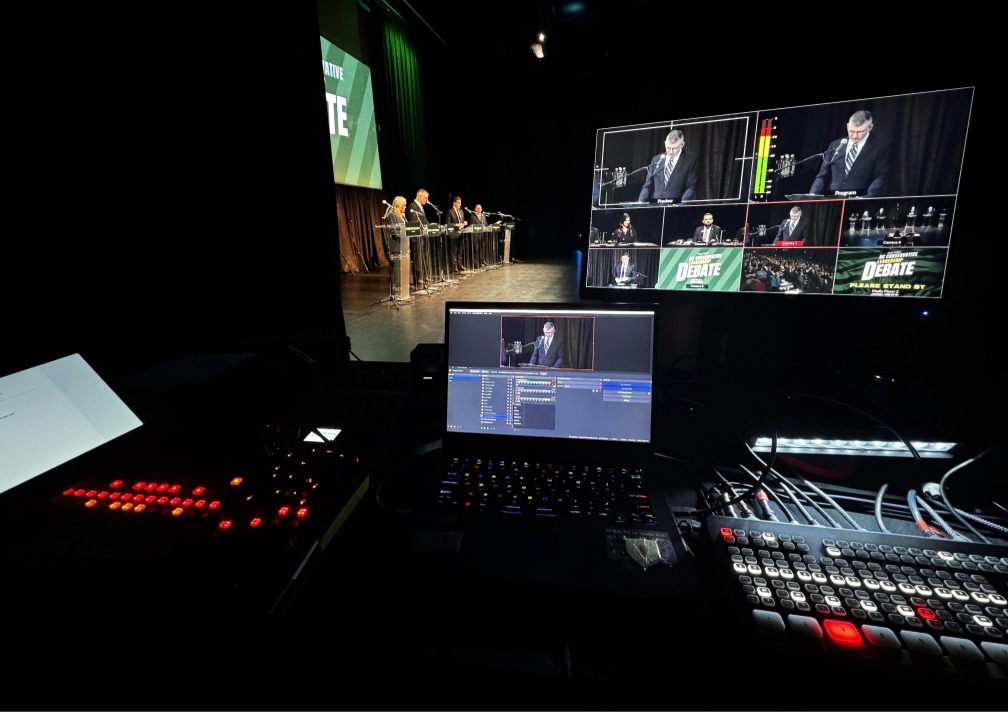
A smooth livestream does not start when the camera turns on.
It usually starts earlier, when the organizer, venue, in-house team, and technical support team are all working from the same plan.
Every venue has its own setup, process, access times, house systems, and technical requirements. That is not a problem. It is part of planning a live, hybrid, or recorded event properly.
The goal is not to work around the venue.
The goal is to work clearly with the venue, so the room experience, livestream, recording, slides, audio, and event flow all line up before the audience arrives.
For event organizers in Vancouver and the Lower Mainland, venue coordination is often one of the most important steps before a livestreamed, hybrid, or recorded event.
Before your event, here are the key things to discuss with your venue.
Room access and setup time
One of the first things to confirm is when the room becomes available.
The event start time is important, but for the technical team, the setup window matters just as much.
Before event day, confirm:
- What time the team can load in
- Which entrance should be used
- Whether there is parking or loading-zone access
- Whether elevator access is needed
- What time the room is available
- How much setup time there is before doors open
- Where cases or extra equipment can be stored
- When everything needs to be packed up and cleared out
-
These details shape the entire setup plan.
A livestreamed event may need time for camera placement, audio routing, internet testing, slide checks, recording setup, and a final run-through before guests enter the room.
The livestream starts long before the event start time.
It starts when the team gets access to the room.
Working with the in-house AV or venue team
Many venues have in-house technical teams who know the room, house audio, screens, lighting, and venue process well.
That knowledge is valuable.
When an outside livestream or production team is involved, the best results usually come from clear communication between the organizer, venue team, and technical support team before event day.
It helps to confirm:
- Who manages the house audio
- Who provides microphones
- Who controls the screens or projector
- Where the audio patch points are
- What the livestream team can connect to
- Who supports the room during the event
- Who approves technical changes on-site
- Who the venue contact is during setup and showtime
This is not about taking over the venue’s systems.
It is about making sure everyone understands their role.
The in-house team knows the room. StreamCity brings livestream, recording, and event production support. When those teams are aligned early, the event is easier to manage for everyone.
This is especially useful for Vancouver and Lower Mainland events, where every venue may have a different room layout, technical workflow, access process, and house system.
Internet and power access
Internet and power are simple details until they are not confirmed.
For a livestreamed or hybrid event, the team needs to know where the internet connection is, what type of connection is available, and whether it can be tested from the actual production location.
Before event day, ask:
- Is wired internet available?
- Where is the connection located?
- Can it be tested before the event?
- Is the network shared with guests or vendors?
- Is there a backup option if needed?
- Is there enough power near the technical setup area?
- Are there venue rules around cable paths or tape?
This does not need to be complicated, but it should not be assumed.
A venue may have internet available, but the production team still needs to know whether it works from the place where the livestream setup will actually be located.
That one detail can save a lot of stress on event day.
Audio and microphone planning
Audio is one of the most important parts of a livestreamed or hybrid event.
The room can sound fine to people attending in person, while the online audience may still have trouble hearing clearly.
That is why the audio plan should be discussed with the venue or in-house team before the event.
Confirm:
- Which microphones are being used
- Whether speakers, panelists, and audience questions need microphones
- Whether the house audio can be sent to the livestream
- Whether presentation or video audio needs to be included
- Whether remote presenters need to be heard in the room
- Whether the recording needs the same audio feed as the livestream
-
Good audio planning is not just about volume.
It is about making sure the right voices and media are reaching the room, the stream, and the recording.
If people cannot hear clearly, they cannot follow the event.
Slides, video playback, and screen content
Slides and video content should be part of the venue conversation, especially when the event includes both in-person and online audiences.
Before the event, confirm:
- Who is running the slides
- Which laptop or source will be used
- Whether videos include audio
- Whether slides need to appear on the livestream
- Whether slides should be included in the recording
- Whether the online audience can read the slides clearly
- When final files will be available
- Whether backup files are ready
Slides can seem like a small detail, but they often affect the whole event flow.
If a video has sound, that audio may need to go to the room, the stream, and the recording. If slides are important to the presentation, the online audience needs a clear way to see them.
Testing this before the room fills is always easier than solving it during the program.
Camera placement and sightlines
Camera placement is another detail worth discussing early.
The goal is to capture the event clearly without blocking guests, presenters, venue staff, or walkways.
Before event day, confirm:
- Where cameras can be placed
- Whether tripods or stands are allowed in certain areas
- Whether cameras will block sightlines
- Where presenters will stand or sit
- Whether the stage, screen, and speakers are visible
- Whether there are venue rules around equipment placement
- Whether camera positions affect guest movement or accessibility
This is where a walkthrough can be especially helpful.
A camera position that looks fine on a floor plan may feel very different once the room is set with tables, chairs, screens, staging, and guests.
Seeing the room in advance helps everyone make better decisions.
Recording needs
Recording should be discussed before the event, not added as an afterthought.
A livestream can often be recorded, but that does not always mean the recording will meet the organizer’s needs afterward.
Before the event, ask:
- Does the event need to be recorded?
- Is the livestream recording enough?
- Are speaker closeups needed?
- Should slides be included in the recording?
- Is the recording for internal use, public sharing, training, or promotion?
- Will the recording need to be edited afterward?
- Who needs access to the final recording?
This matters because the way an event is captured may change depending on how the recording will be used.
A simple archive recording is different from a polished event video, speaker recording, or presentation recap.
For Vancouver event organizers planning live streaming and video recording together, it helps to discuss this early so the stream and recording are planned as part of the same event flow.
Technical walkthrough
A walkthrough helps turn assumptions into confirmed details.
It gives the organizer, venue team, and technical support team a chance to look at the actual room, not just the schedule or floor plan.
A walkthrough can help confirm:
- Where the technical team will set up
- Where cameras can go
- Where microphones will be used
- Where the internet and power are located
- How slides and videos will be handled
- Where the audience will sit
- How guests will move through the room
- Where ASL interpreters, captioning support, or remote presenters fit into the plan
- What needs to happen before doors open
This does not always need to be a full rehearsal.
Even a focused walkthrough can help everyone understand the space, timing, responsibilities, and possible adjustments before event day.
When StreamCity is involved early, we can help organizers ask the right technical questions, coordinate with the venue or in-house team, and make sure the room setup, livestream plan, recording needs, and event flow are all considered together.
Run of show and communication
A current run of show is one of the most useful tools for a livestreamed or hybrid event.
It helps the organizer, venue team, speakers, and technical support team understand what is happening next.
Before event day, confirm:
- Who has the latest version of the run of show
- Who updates the technical team if the schedule changes
- When speakers are arriving
- When videos or slides need to appear
- Whether there are accessibility cues
- Whether remote participants need to join at a specific time
- Who is the main point of contact on-site
-
Small changes can affect the technical plan.
A speaker may be added.
A video may move.
A panel may start earlier.
A land acknowledgement may shift.
A recording cue may be added.
None of this is unusual.
It just needs to be communicated clearly.
Everyone should be working from the same version of the event.
Accessibility and remote audience needs
For hybrid and livestreamed events, the online audience should be considered before the event begins.
That includes access, audio, visuals, captions, interpretation, and how remote viewers will follow the program.
Before event day, discuss:
- Whether ASL interpretation is needed
- Whether captions are needed
- Whether translation or interpretation is part of the event
- Whether remote presenters are joining
- Whether online viewers need instructions
- Whether Q&A needs to include both in-room and online audiences
- Whether the recording needs to include accessibility elements
-
This is part of the event experience.
If people are joining online, they need to be able to follow what is happening with the same clarity and care as the people in the room.
What the venue may need to provide
Every venue is different, but it helps to confirm what is already available and what needs to be brought in.
Depending on the event, the venue may need to provide or confirm:
- Room access
- Loading access
- Power
- Internet
- House audio
- Microphones
- Screens or projectors
- Technical contact
- Cable path approval
- Lighting conditions
- Setup rules
- Timing for doors, rehearsals, and load-out
This does not mean the venue needs to provide everything.
It simply helps the organizer and technical team understand what is already in place and what needs to be planned separately.
Clear information early helps avoid confusion later.
Final venue coordination questions
Before a livestreamed or hybrid event, organizers should be able to answer a few practical questions:
- When can the technical team access the room?
- Who is the venue contact?
- Who manages in-house AV?
- Where can the livestream team set up?
- Is wired internet available and testable?
- Where is power available?
- How will microphones connect to the livestream or recording?
- Who is running slides and video playback?
- Are there camera placement rules?
- Is the event being recorded?
- Does the recording need slides, speaker closeups, or edited delivery?
- Are captions, ASL, interpretation, or remote presenters involved?
- Who has the latest run of show?
- Who approves last-minute changes?
These questions are not meant to make the process more complicated.
They are meant to make the event easier to support.
The earlier these details are clear, the smoother the day tends to feel.
Planning a livestreamed or hybrid event in Vancouver?
A smooth event starts with clear communication before event day.
StreamCity helps organizers coordinate the technical details with venues, in-house teams, and event stakeholders so the room experience, livestream, recording, and event flow are aligned before the audience arrives.
Explore our Live Streaming Services.
Need help with room audio, microphones, screens, or event-day technical support? Learn more about On-Site AV Support.
Ready to talk through your event? Contact StreamCity.
You can also read our related guide: What Event Organizers Should Check Before Going Live.
Q&A
What should I ask my venue before livestreaming an event?
Ask about room access, load-in time, internet, power, audio connections, microphones, screens, camera placement, in-house AV support, recording needs, and who the technical contact will be on event day.
What does a venue need to provide for a livestream?
Every event is different, but a venue may need to provide or confirm room access, power, internet, audio connections, microphone support, screen access, setup rules, and a technical contact. Some items may be handled by the venue, while others may be handled by the livestream or AV support team.
Start by confirming who manages house audio, microphones, screens, projector access, and technical changes. Then make sure the organizer, venue team, in-house AV team, and livestream support team understand who is responsible for each part of the event.
How much setup time is needed for a livestreamed event?
Setup time depends on the event size, room layout, audio needs, camera positions, slides, recording requirements, and whether a technical walkthrough is needed. The most important step is to confirm room access and setup time before event day.
Do I need wired internet for a livestream?
Wired internet is often preferred for livestreamed events because it can be more stable than shared venue Wi-Fi. The connection should be tested from the actual production location before the event whenever possible.
Can a livestream also be recorded?
Yes, many livestreamed events can also be recorded. However, recording needs should be discussed early. A livestream recording may be enough for some events, while others may need dedicated recording, speaker closeups, slide capture, or post-event editing.
Why is a technical walkthrough helpful?
A walkthrough helps the organizer, venue team, and technical support team confirm the room setup, internet, power, audio, slides, camera placement, recording needs, and event flow before event day.
When should StreamCity be involved?
StreamCity should be involved early enough to review the venue setup, event flow, livestream needs, AV requirements, recording goals, and any coordination needed with the venue or in-house team.