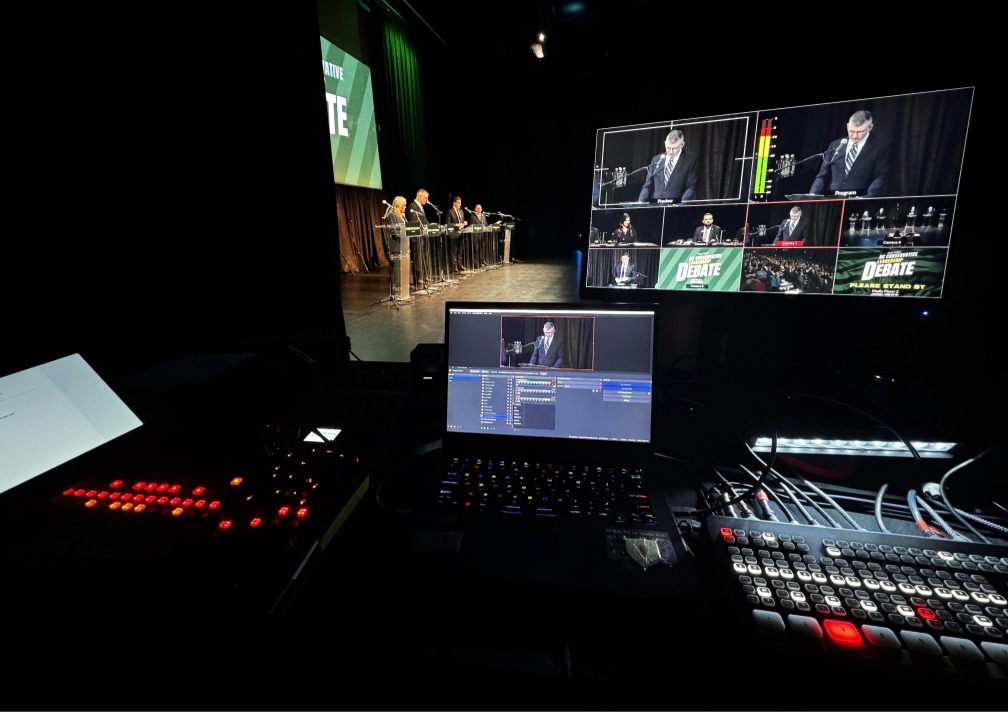
A multi-room conference can look manageable on paper, then become complicated very quickly once several rooms, presenters, slide decks, microphones, and schedules all start moving at once.
That is why some conferences feel smooth and organized, while others start to lose time the moment the first breakout session begins. In most cases, the difference is not effort. It is preparation. The more clearly the technical and presentation details are locked down before the conference begins, the easier it becomes to keep the event moving calmly once people arrive.
For organizers, that usually means thinking beyond the main room. A multi-room event depends on consistency across breakout spaces, reliable presentation support, clear audio, room-by-room readiness, and a realistic plan for how last-minute changes will be handled on site.
Event at a Glance
Event type: Multi-room conference
Common pressure points: Breakout rooms, slides, microphones, playback, timing, presenter support
What often goes wrong: Inconsistent room setups, unclear responsibilities, missing connections, last-minute content issues, avoidable delays
What helps most: Locking down room needs, presentation workflows, audio plans, and on-site support before event day
Why it matters: A clear plan reduces friction for organizers, presenters, and attendees across the full event
Why Multi-Room Conferences Get Complicated So Quickly
A single-room conference has one central technical environment to manage. A multi-room conference multiplies that environment.
Now there may be a ballroom, multiple breakout rooms, different presenters, separate slide decks, different microphone needs, media playback in one room but not another, and a schedule that needs to stay coordinated across all of it. Even if each room seems simple on its own, the event becomes much harder to manage once everything is happening in parallel.
That is also where organizers can run into trouble. The main room often gets most of the attention, while the secondary rooms are treated like they will somehow “just work.” But if breakout rooms are not planned carefully, even small issues can create delays, confusion, and stress for speakers and staff.
1. Lock Down What Each Room Actually Needs
One of the most common mistakes in conference planning is assuming every room needs the same setup.
In practice, one room may need full presentation support, another may only need a screen and microphone, and another may need video playback, Q&A support, or hybrid participation. The earlier those differences are identified, the easier it becomes to assign the right support, the right equipment, and the right expectations.
Before the conference begins, organizers should know:
which rooms need presentations
which rooms need microphones
which rooms need playback
which rooms need dedicated support
which rooms can run more simply
That helps prevent overbuilding some spaces and underpreparing others.
2. Confirm How Presentations Will Be Managed
Presentation support is one of the biggest pressure points at multi-room events.
When multiple speakers are arriving with different slide decks, different file types, last-minute revisions, or unfamiliar laptops, the event needs a clear plan for how content will be collected, checked, loaded, and advanced. If that workflow is vague, the problem usually shows up on event day.
A stronger approach is to decide early:
who is collecting slide decks
where final files will be stored
whether presenters are using their own laptops or event laptops
who is responsible for playback in each room
how last-minute updates will be handled
This matters because delays around slides are not just technical delays. They interrupt pacing, create stress for presenters, and make the event feel less organized than it is.
3. Do Not Treat Audio as an Afterthought
Poor audio causes problems faster than almost anything else at a conference.
If attendees cannot clearly hear presenters, or if microphones are inconsistent from room to room, the event starts to feel fragmented. That is especially true when breakout rooms vary in size, seating layout, and speaking style.
Organizers should confirm early:
which rooms need wireless handheld microphones
which rooms need a lectern microphone
which rooms need simple speech reinforcement
which rooms may include discussion or audience questions
who is responsible for managing audio during transitions
A clear room-by-room audio plan helps create a more consistent experience for both presenters and attendees.
4. Make Breakout Room Consistency a Priority
Breakout sessions often feel smaller than the main conference program, but they carry a lot of the attendee experience.
If one breakout room is easy to walk into, easy to hear, and easy to present in, while another feels disorganized or unsupported, attendees notice. So do speakers.
That is why consistency matters. Organizers do not always need every room to be identical, but they do need each room to feel ready. That usually means confirming:
display size and visibility
basic connectivity
presentation control
microphone availability
power access
who to call if something changes
When breakout rooms are planned clearly, they reduce friction instead of creating it.
5. Decide Who Owns What on Event Day
A multi-room conference creates confusion very quickly when responsibilities are unclear.
If the organizer assumes the venue is handling something, the venue assumes the AV team is handling it, and the presenter assumes someone else already checked it, the event can lose time before anyone realizes where the gap is.
That is why one of the most important things to lock down is ownership.
Before the conference begins, it should be clear:
who handles each room
who manages slides and playback
who supports presenters
who responds to technical issues
who coordinates with the venue
who makes decisions if the schedule changes
This is one of the simplest ways to reduce event-day scrambling.
6. Confirm Venue Access, Timing, and Practical Constraints
Even a strong conference plan can start breaking down if the venue-side details have not been confirmed early enough.
Access windows, loading, power, internet, projection paths, setup timing, room resets, and working hours all affect what is realistic. These details are easy to underestimate when the schedule is still being built, but they often shape the day more than organizers expect.
For that reason, event teams should confirm:
when rooms are available for setup
how early testing can begin
what venue rules affect access or technical integration
whether internet or power limitations apply
how room turnover will work between sessions
These details are not always visible to attendees, but they often determine whether the conference runs smoothly behind the scenes.
7. Plan for Last-Minute Presenter Changes
At almost every conference, something changes late.
A speaker shows up with a revised deck. A video file is not formatted properly. Someone needs a microphone that was not requested. A breakout room runs long. A presenter wants to use their own laptop. None of these situations are unusual. The problem is not that they happen. The problem is when there is no process for handling them.
A stronger conference plan expects last-minute changes and builds around them. That usually means:
having a clear content workflow
knowing who can approve changes
keeping backup playback options available
making sure each room has a support path if something shifts
That kind of preparation helps the event stay calm when reality becomes messier than the schedule.
8. The Goal Is Not More Complexity. It Is Fewer Unknowns.
Organizers do not need to overcomplicate a multi-room conference. They need to remove unknowns.
That is the real value of locking details down early. It makes the event easier to run. It makes presenters more comfortable. It makes breakout rooms more consistent. It reduces stress for staff. And it helps the full conference feel more organized, even when the program is moving quickly.
The strongest event plans are not the most complicated ones. They are the ones where the important details were handled early enough that the event team is not solving preventable problems in real time.
Why This Matters for Conferences in Vancouver and Beyond
Multi-room events in Vancouver often involve venue coordination, varied room layouts, presenter-driven content, and schedules that need to move cleanly across the day. Whether the event includes keynote sessions, breakout discussions, community programming, or organizational updates, the same principle holds: the more clearly the event is planned before doors open, the easier it becomes to keep the day on track.
That is especially important when the event includes multiple rooms, multiple speakers, and a mix of presentation, discussion, and playback needs.
Questions Organizers Often Ask
What is the biggest risk at a multi-room conference?
One of the biggest risks is assuming the breakout rooms will be simple. When presentation support, audio, timing, and room ownership are not clearly defined, even small issues can create delays.
Do all breakout rooms need the same AV setup?
Not always. Some rooms may need full presentation support, while others only need a basic display and microphone setup. The key is defining those needs early.
Why is presentation management so important at conferences?
Because multiple presenters, last-minute file changes, and different content formats can create delays if there is no clear process for collecting, checking, and playing back content.
What should organizers confirm with the venue before a multi-room event?
Setup access, room availability, power, internet, technical restrictions, turnover timing, and any venue-side responsibilities that affect event-day execution.
How can organizers reduce stress on event day?
By locking down room needs, presentation workflows, audio plans, responsibilities, and support paths before the conference begins.
Can StreamCity support multi-room conferences?
Yes. StreamCity supports conferences with presentation support, live event production, audiovisual coordination, room-by-room readiness, and dependable event-day execution.
Planning a multi-room conference, breakout session program, or live event with several moving parts?
StreamCity supports conferences with presentation coordination, audiovisual support, live event production, and event-day technical execution.
Explore Live Streaming Services, browse more Blog articles, or contact the team to discuss your event.
https://www.streamcity.ca/
https://www.streamcity.ca/live-streaming-services/
https://www.streamcity.ca/form/
https://www.streamcity.ca/blog/
https://www.streamcity.ca/blog/category/blog/
https://www.streamcity.ca/blog/category/case-studies/